Building Problem Solving Skills with Scratch Block Coding
What is Scratch?
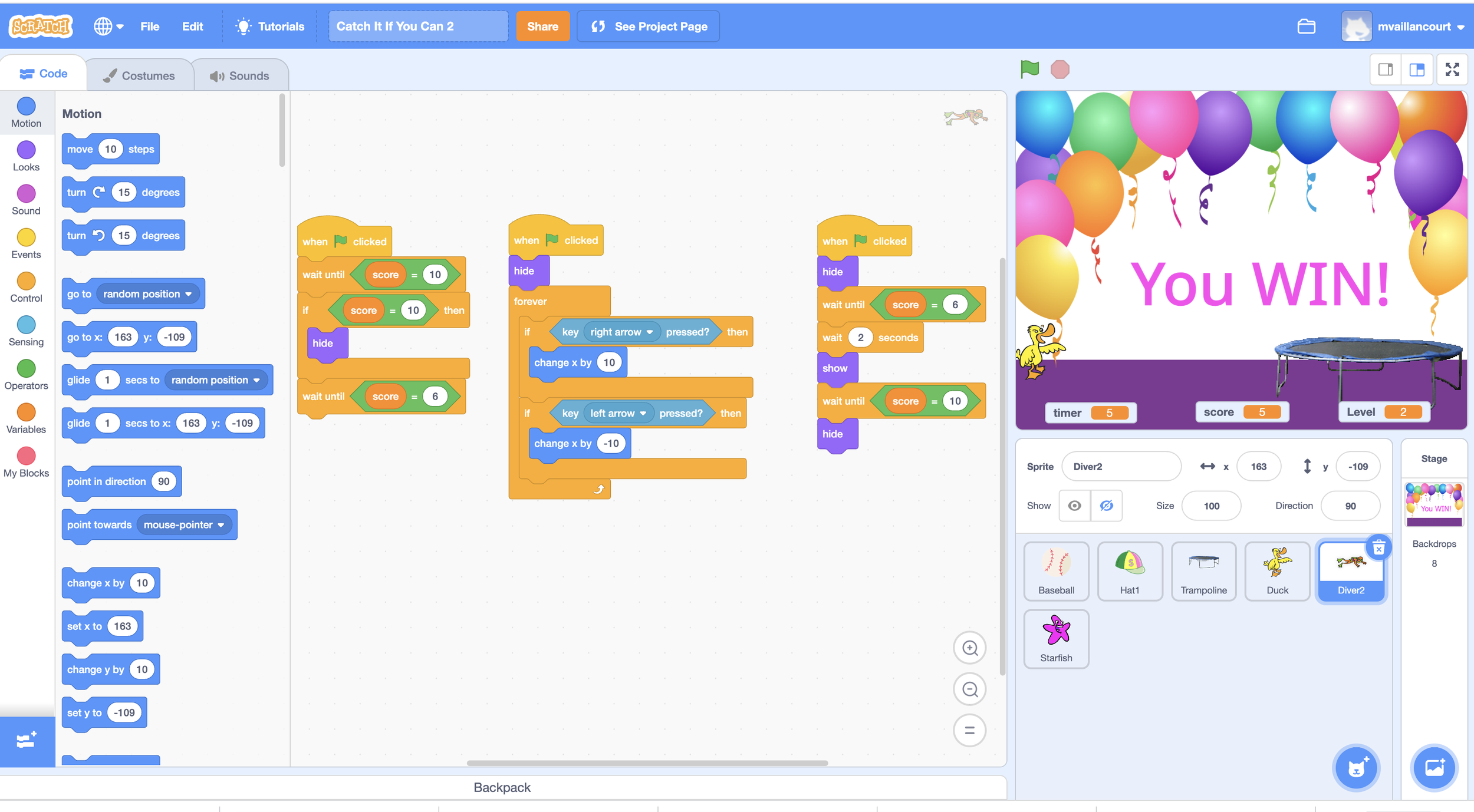
Scratch is a free software program designed and shared by the Massachusetts Institute of Technology. It provides tools for individuals beginning at age 5 (Scratch Junior) to learn and enjoy block coding. Using a drag and drop platform, learners create animation, games, and stories. Scratch utilizes a user-friendly interface to teach coders of all ages basic programming concepts including variables (such as a score or timer), conditionals (if-then statements), loops, and functions (reuse of code). Learners debug (fix errors in the code) and iterate. Learners also manage mathematical constraints and gain an understanding of a geometrical grid used to program placement and movement.
The Scratch Community
Scratch is used internationally in elementary curriculums to help young learners engage in lessons in computer coding. Scratch encourages social learning through the ability of scratchers to share their game or story with the Scratch community. Likewise, learners can repurpose coding from others in the Scratch community to iterate and rebuild the code of someone else’s game or story to make it their own. Learning from others is an essential component of the Scratch platform.
These shared learning experiences create a sense of being part of a like-minded community of programmers who challenge each other to iterate and create. With Scratch learners also manage music, story text, and art, with an eye on creative design. Moreover, learners find Scratch to be highly motivational to use for learning more about computer technologies, such as upload of images, management of text, downloading and saving files to a computer (Choleva et al., 2022).
Scratch and Problem Solving
Scratch develops solid problem solving skills and fosters a positive attitude toward computer technologies. Scratch also encourages the sharing of creative ideas with other learners similar in age and grade level. Here’s how.

Think of an animation where a character moves across the page. How can that be achieved? It’s a problem.
Where on a background will the movement happen?
How fast will it happen?
How far will the character move?
How can I get the character to start moving and then to stop?
In order to solve the problem coders need to think in sequence. What comes first, next, last? Then they must stack the blocks of code to make that happen.
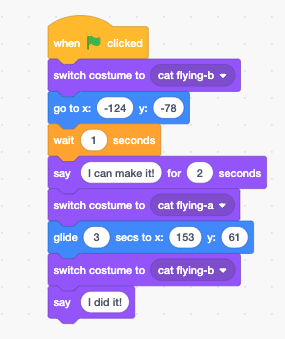
Let’s take a look. All animations in Scratch begin by clicking a green flag. The child will need to start coding by pulling the when green flag is clicked block of code. The cat has two animations, or costumes as they are called in Scratch. It begins vertically with its arm extended and then moves to a horizontal flight. The child needs to determine where the cat will start, what it will say, when it begins to glide to the fence, and how far it needs to glide. Each of those placements and actions have to be correctly sequenced or the cat will never get to its intended destination. If the child stacks the blocks of code incorrectly, then problem solving kicks into high gear to figure out errors in the sequence of code. Thus, coding even a simple movement in Scratch requires planning, problem solving, management of failure, iteration, and the satisfaction that comes with success.
https://tinyurl.com/4yjm8wke
Applying Problem Solving Skills
The child now steps away from their Scratch project and begins to focus on a story that needs to be written. It’s a problem. What will the story be about? What comes first in the story? How does the story build? The problem solving skills and linear thinking required to solve an animation in Scratch to the rescue. Or perhaps attention moves to math homework. Math is all about solving a problem through a sequence of steps. Here the problem solving skills gained in Scratch go to work.
Perhaps the child need to plan an experiment. It’s a problem. What is needed? What steps must be taken in performing the experiment? What is the expected outcome? What happens if the experiment failed? Does the child give up in frustration or look at the steps and figure out what needs to be fixed in order for the experiment to proceed as planned?
Perhaps the child looks at their room and sees a mess of clothes on the floor, toys tossed here and there, and quite the messy set of shelves. It’s a problem? What needs to be done first, next, and then to solve the problem? What is the desired outcome? What if the child decides its too much to do at one time. Will the child return to the task and pick up when they left off and finish what was started?
The Thinking Place
https://tinyurl.com/4yjm8wke
It’s not just problem solving that the child gains through building Scratch animations, games, and stories. It’s an understanding that failure is not the end, but the beginning of better. Failure is seen as an opportunity to make improvements. This resilience is essential for growth. Tenacity also is a bi-product of the problem solving that goes into building a Scratch animation. Staying with a task until it is completed, even if that means coming back to it later, is an important life skill no matter the age. With Scratch children enter their own thinking place where ideas are generated, problems solved, and creativity blooms. It’s a place where success comes in small intervals to energize solving the next problem, and the next and the one after that. It fosters an I can do it attitude that sustains children through pesky math problems or studying for a history test, or just figuring out how to manage planning what’s needed to go outside on a cold day. Simply stated, the problem solving skills acquired by building simple to complex Scratch animations, games, and stories foster independence and self-efficacy in children. The begin to believe they can manage even the most challenging problems.
Best of all, being able to code allows the child to teach the adult. Look what I made! “How did you do that?” With that the child begins to explain their thinking process, reinforcing problem solving skills. Learning is best accomplished through teaching. By sharing sharing the how and why of a coded project, children deepen their learning, develop collaborative skills, and learn to manage feedback. It allows a child to become a subject matter expert, building confidence and the ability to share ideas and goals. And, it allows parents to watch their child grow as they become more and more comfortable with their personal thinking space.
What to do next?
Scratch is free software. It is a shared community, so be sure to be with your children when they set up their Scratch username and password. They should never use their real name as part of their username, and always choose a password that is a combination of capital letters, lowercase letters, numbers, and symbols. It’s great for scratchers to have a notebook set aside where they keep their username and password for reference. Here they also can plan out their animations and note needed iterations. To find Scratch go to https://scratch.mit.edu/